Digitalcarnage - A self hosted server
digitalcarnage.co.uk a self-hosted, homelab server based in the United Kingdom.
- Start Here
- Server Applications
- Domains Hosted
- Backups and howto
- Nextcloud Office
- Multipule instances installed
- Application Details
- Backrest (for Restic)
- Bludit
- BookStack
- Collabora Online
- InvoiceNinja 5
- Jellyfin
- Linkstack
- Lychee
- My Web
- Navidrome
- Nextcloud
- phpMyAdmin
- Piwigo
- Pure Blog
- Roundcube
- Shaarli
- Vaultwarden
- WordPress
- My backup system in a bit more detail
Start Here
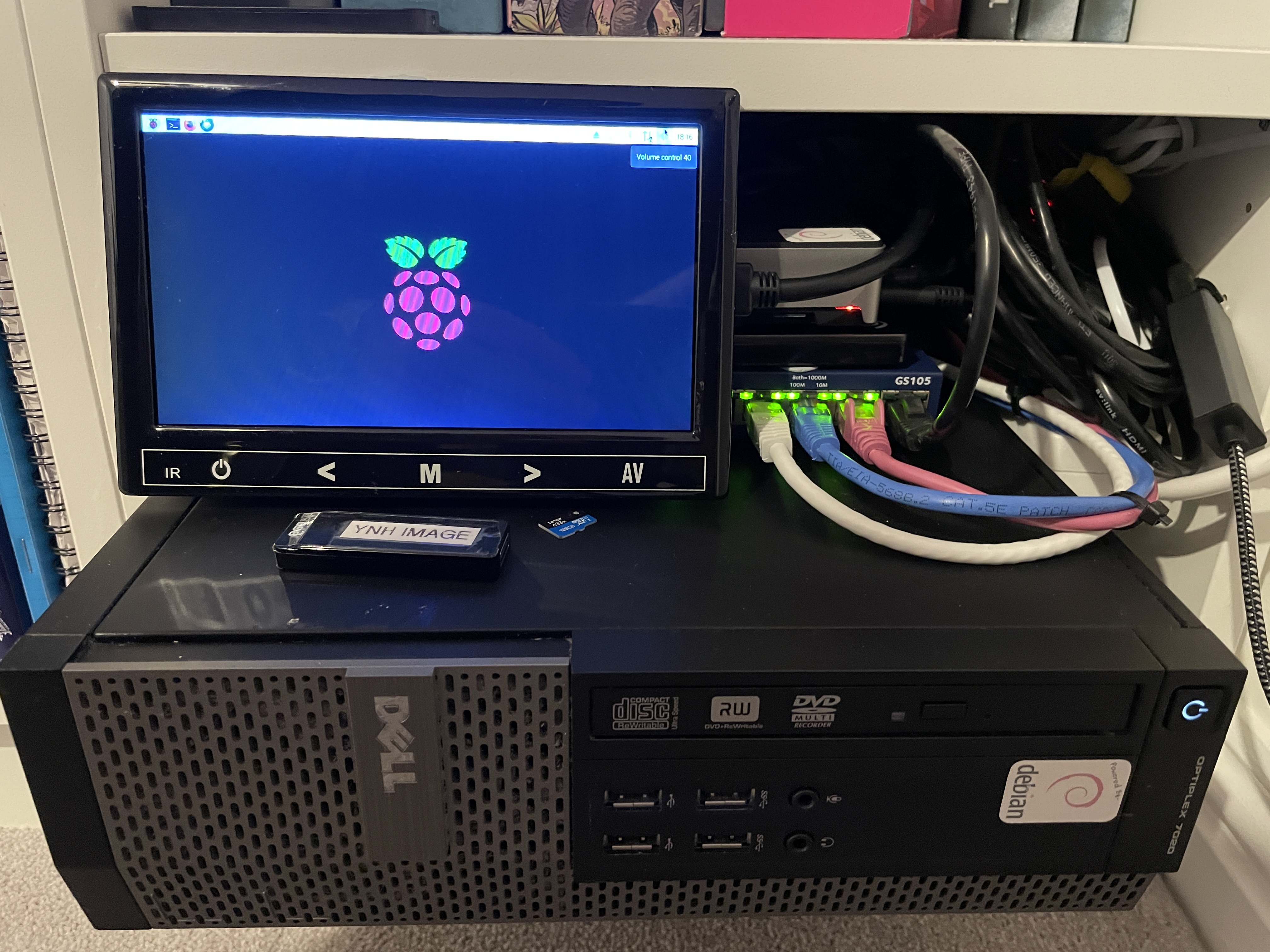 The server software used is the freely available Yunohost server software, which uses Debian Linux. Several applications, some public and some private, are hosted on this server. See this page for the full list of applications currently installed.
The hardware is a Dell small form factor (SFF) 7020 desktop PC with an i7 4770 processor, 16 GB of RAM and a 2TB hard drive. (An old-fashioned spinner!). There is a nightly mail and data backup, as well as a full backup on weekends. The backup is a simple cron job that performs a backup to an external 1 GB solid-state drive. A 1 GB drive is used as a second backup using Restic.
There are several domains hosted on the server that are registered through iWantmyname. See the full list of domains here in this chapter.
For details about installing Yunohost and creating your self-hosted server, you can just jump straight in here to get started.
Digitalcarnage Base System
| OS |
Kernel |
Linux Name |
Yunohost Version |
| Debian 12.14 |
6.1.0-53-amd64 | Bookworm |
12.1.41.2 (stable) |
Digitalcarnage's current server status can be found here. You can see the server's health here at Cronitor. Healthechecks.io Restic backup status:

Server status uses the Uptime Kuma monitoring tool hosted by PikaPod. It’s always best to have your monitoring service not on your own server!
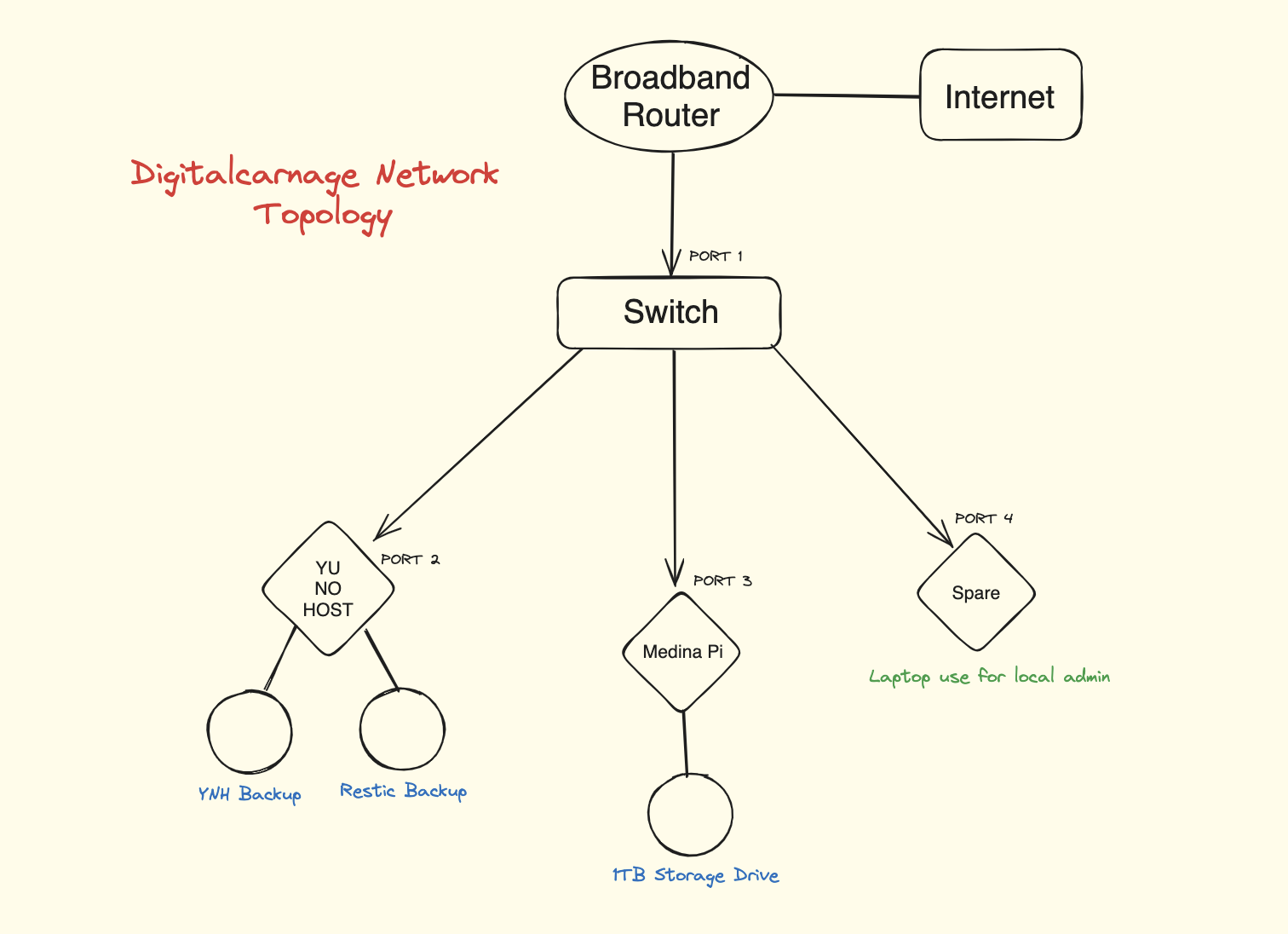
The full setup includes a Raspberry Pi 4, which is used for "local" external access by admins, and selected users only use WireGuard as a VPN to allow “local” access to the Yunohost server. Real VNC Server is also installed on the Pi.
Server Applications
There are several applications for use on this server; the public can use some of them, but for the most part, they are for private use. However, an account can be created on those apps by asking the admin to create one for you. SELF-REGISTRATION IS DISABLED on most apps for obvious reasons!
| Application Name |
Type of Application |
Link to Author |
Link on this server |
Notes |
| Backrest | Restic frontend | Backrest | Backrest | Admins only |
| Bludit |
Flat File CMS |
Bludit |
Bludit |
Del Jones website |
| Bookstack |
Document Wiki |
Bookstack | Bookstack | This server's wiki |
| Collabora Server | Office suite server | Collabora | Collabora | Nextcloud Office |
| InvoiceNinja |
Invoicing | InvoiceNinja |
InvoiceNinja |
PRIVATE |
| Jellyfin |
Media server |
Jellyfin |
Jellyfin |
You must have an account |
| LinkStack |
Contact sharing |
LinkStack |
LinkStack |
Del Jones' contact details |
| Lychee | Photo Gallery App | Lychee | Lychee | DJLD Capture gallery |
| My WebApp |
Non YNH app installer |
My WebApp |
My WebApp |
Used for DJ bio |
| Navidrome | Music and Radio Server | Navidrome | Navidrome | You must have an account |
| Nextcloud |
Collaboration platform | Nextcloud |
Nextcloud |
You must have an account |
| Piwigo |
Photo management | Piwigo |
Piwigo |
You must have an account |
| PhpMyAdmin | MySQL Admin | phpMyAdmin | PhpAdmin | Admin access only |
| Pure Blog | Derek Jones Blog | Pure Blog | Pure Blog | Blogging app |
| Pure Comments | Comments app | Pure Comments | Pure Comments | Admins only |
| Roundcube |
Web-based email |
Roundcube |
Roundcube |
You must have an account |
| Shaarli |
Bookmark manager |
Shaarli |
Shaarli |
You must have an account |
| Vaultwarden |
Password Manager |
Vaultwarden | Vaultwarden |
You must have an account |
| WordPress | Blog/Website publishing |
WordPress | WordPress | Multiple instances installed |
Domains Hosted
There are several domains hosted on this server, all of which are registered through iwantmyname. There is one domain that is registered with DynDNS courtesy of Yunohost. When you install a Yunohost server, you receive one free domain. Click here for more details about installing your free domain once you have installed a Yunohost server.
DOMAINS (and sub-domains) HOSTED ON THIS SERVER
Domains & sub-domains
Yunohost/dynDNS domain
Backups and howto
There is a more detailed section here on backing up using Restic. Currently being written...
This Yunohost server is backed up onto two separate USB drives, both of which are on-premises. Several attempts have been made to perform an off-premises backup using both Borg and Restic, but I have found them to be more difficult than they’re worth, as well as expensive, so I am doing backups on-site only using the built-in Yunohost backup and recovery service and Restic, both to their own separate USB drives.
Drive 1 (Drive label: YNHRECOVERY)
This backup uses the built-in Yunohost backup and recovery service. A simple cron job is used, detailing the time and what is to be backed up.
FULL BACKUP
- Time: Midnight every Wednesday and Sunday
- What: EVERYTHING. (accept multimedia items like videos, photos, and music) This is a full backup. Everything is checked off in the Yunohost backup service. There is a .nobackup file in the folder /home/yunohost.multimedia. This blank file prevents this folder from being backed up.
OTHER ITEMS THAT ARE BACKED UP INCLUDE:
- Time: 4 AM EVERY day.
- What: User emails.
- Time: 5 AM EVERY day.
- What: User home folders
Drive 2 (Drive label: DATARECOVERY)
Restic is a backup service that can be installed from the CLI or through the Yunohost application catalogue. On this server, it has been installed using the CLI.
The backup used to be a cron job, but recently the excellent Restic GUI, Backrest, has been installed and is now in use. Using this app, you can create Restic repos, view and download the contents of a repo, set the times of the backup, and set retention.
ALL items in the folder - /home/yunohost.multimedia are backed up to drive 2 DATARECOVERY
- Time: 3 AM every Saturday
- What: The /home/yunohost.multimedia folder.
- Time: 11 PM every day
- What: Piwigo Photo Uploads folder
- Time: Every hour, every day
- What: All users' Nextcloud data folders
Current Healthchecks status:
Below I have kept some useful Restic commands, just in case...! Well, you never know...
Where is the Restic app located? Type: which restic will show you where the app is located on your drive.
Where is my Restic repository located? The Restic repository is located at media/datarecovery/restic. This is a symbolic link from the Restic directory on the main drive. The physical drive is a USB spinner labelled “datarecovery”.
What is the latest installed Restic version?
Type: restic version. This will tell you the current version, which right now is 0.19.1 (Note: The Restic version is not the same version that appears in Backrest, as shown in the top left corner of the app, which at the time of writing is v1.14.1)
You can use these commands within the Backrest app; just remove the word ‘restic’ from the command. The commands below are for if you are using the terminal.
Can I update Restic? Type: restic self-update. If there is an update available, it will be downloaded and installed.
Has the backup happened? Type: restic check -r /media/datarecovery/restic
How do I change the backup schedule? Type: crontab -u root -e Nano will open, and you can edit the time and contents of your backup. This cron job now runs the Yunohost backup to drive 1 'YNHRECOVERY' only.
Can I see the snapshots? Type: restic -r /media/datarecovery/restic snapshots
Can I see the contents of the snapshots? Type: restic ls (snapshotID here) --repo /media/datarecovery/restic
Can I mount the snapshot? Type: restic -r /media/datarecovery/restic mount /mnt/restic
NOTE: For most of the above commands, you will require the Restic password that you set up when you created your repository, etc.
Nextcloud Office
The Nextcloud instance hosted here, and their users have access to the online Collobara office suite. The Collobara Server is located in the digitalcarnage.co.uk domain as office.digitalcarnage.co.uk.
Multipule instances installed
This server has multiple instances of WordPress installed.
Worpress - Multipule instances
This server contains three instances of the popular but sometimes frustrating app, WordPress.
- Derek Jones Lighting Design - The website for Derek Jones Lighting Design.
- The Vantours travel blog - The Vantours travel blog is a travel website.
- A previous version of the Vantours travel blog. This WordPress site was previously hosted on a QNAP NAS that went horribly wrong, but was recovered and now forms part of the vantours.co.uk website
Application Details
A more detailed description of the applications installed on this server.
Backrest (for Restic)
Backrest is a web-based management interface that makes working with Restic backups much more approachable and easy to deal with.
Instead of relying entirely on the command line, it gives you a clean dashboard for configuring backup jobs, checking backup status, reviewing history and handling restores with less friction.
It is especially useful for people who like Restic’s reliability and efficiency but want a more convenient, visual way to manage their backup workflow. As a real ‘non-tech’ type, I recommend this tool.
I also have this tool installed on my laptop and back up using a VPN connection to an SFTP server at home. I also backup externally using iDrive S3. Very useful
Bludit
Bludit is a lightweight, flat-file blogging and content management system that lets you create and manage websites without needing a database.
It’s easy to use, quick and perfect for blogs, personal sites and small projects.
I used to use this for my website, but I found the support and documentation a bit lacking. Also, for what I was using it for, it was probably a bit much. I have since switched to Pure Blog, which is so simple and easy to use.
BookStack
BookStack is a platform that you can set up yourself to help you create, organise and share information in a neat and easy-to-use way.
It uses a simple structure of books, chapters and pages, which makes it straightforward to group related information and create clear, organised documentation libraries.
BookStack is often used for internal wikis, step-by-step guides (SOPs), onboarding guides, project notes and technical documentation because it provides a clean editing experience, a powerful search function and flexible permissions to control who can see or edit the content.
With its easy-to-use interface and focus on simplicity, BookStack is a practical choice for teams that want a lightweight but powerful way to keep knowledge in one place.
I use BookStack as a wiki for this website and my yunohost domain, digitalcarnage.
Collabora Online
Collabora Online with Nextcloud is a fantastic document editing tool that brings real-time collaboration right into your Nextcloud space. It lets you create, open and edit office documents, spreadsheets and presentations in your browser without having to install any desktop software.
It’s based on the open-source Collabora Online office suite, which makes it easy for multiple people to edit the same file at the same time, with all the changes showing up instantly. Plus, it works well with Nextcloud’s file storage and sharing features, so you get a smooth workspace for teams, organisations and individual users who want a private, self-hosted option instead of the usual cloud productivity tools.
This is especially helpful for teams that need secure document collaboration, version control and centralised file management all in one place. You can access files from any device, share documents easily and work together efficiently while keeping your data safe and sound.
InvoiceNinja 5
Invoice Ninja 5 is a flexible, self-hosted invoicing and business management application designed for freelancers, small businesses, and service-based teams. It helps me create professional invoices, track payments, send estimates and quotes, manage clients, and monitor billing activity from one centralised dashboard.
Version 5 continues Invoice Ninja’s focus on clean design and streamlined workflows, making it easier to handle everyday financial tasks without the complexity of larger accounting platforms.
Beyond invoicing, it also supports features such as expense tracking, recurring invoices, payment reminders, credit notes, and client portals, giving businesses a more complete view of their billing operations. Because it can be self-hosted, Invoice Ninja 5 is especially appealing to users who want more control over their data while still benefiting from a modern, polished interface and automation tools that save time.
As a self employed stage lighting designer, I use it on a regular basis.
Jellyfin
Jellyfin is a free, open-source media server that lets you organise, stream and access your personal media collection from anywhere.
It lets you store and manage movies, TV shows, music, photos and other media in one place, then stream that content to a wide range of devices through a web interface or compatible apps.
Jellyfin is designed to give users full control over their media without subscriptions, tracking or cloud dependence, making it a popular choice for people who want a private, self-hosted alternative to commercial streaming platforms.
In addition to media playback, Jellyfin offers helpful features such as user accounts, watch history, subtitles, metadata fetching, library organisation and support for multiple clients and devices. It is especially well suited for households, personal media collectors and enthusiasts who want a customisable and privacy-focused way to manage their digital entertainment library.
All of mu media content is stored and played using Jellyfin, especially movies. I tend to use Navidrome for music.
Linkstack
LinkStack is a self-hosted, open-source “link in bio” platform that lets you create a single, customisable page containing multiple links. It is designed for people who want one simple place to send visitors from social media profiles, email signatures, business cards, or other online spaces where only one link is practical.
Instead of sending people to just one destination, LinkStack gives you a central hub where you can organise all the places you want them to visit.
What makes LinkStack especially appealing is that you run it yourself. That means you have control over the design, the data, and the hosting environment, rather than depending on a third-party service like Linktree. You can use your own domain, adjust the page to fit your branding, and manage the system according to your own needs. This makes it a strong choice for users who value privacy, flexibility, and ownership.
At its simplest, LinkStack turns one link into many. A creator can point followers to a video channel, a shop, a donation page, and social profiles. A business can direct customers to support, booking, products, and contact information. A freelancer can use it as a neat portfolio gateway. The page is usually mobile-friendly, easy to update, and built to keep everything clean and accessible.
In short, LinkStack is a practical tool for anyone who wants a polished, self-managed link hub without depending on a commercial platform. It combines convenience with control, which is a very respectable little internet superpower.
You can see my LinkStack here.
Lychee
Lychee Photo Gallery is a self-hosted platform for organising, viewing, and sharing photos in a clean, modern interface. It is designed for people who want more control over their image library than they would get from a cloud-based photo service. Instead of relying on a third party to store and manage your pictures, Lychee lets you run your own gallery on your own server, VPS, home machine, or hosting setup. That makes it a strong choice for anyone who values privacy, ownership, and flexibility.
At its core, Lychee is built to make photo management simple and visually appealing. You can upload images, create albums, browse your collection, and share galleries with others in a polished format. The interface is lightweight and easy to navigate, which helps keep the focus on the photos rather than the software. It is especially useful for photographers, families, and anyone who wants a neat way to present and organise images without a complicated workflow.
One of Lychee’s biggest strengths is that it gives you full control over your content. Since the photos are stored on your own infrastructure, you decide who can access them and how they are shared. This makes it a practical option for private albums, client galleries, event photos, or long-term personal archives. Unlike large commercial services, Lychee is not tied to subscription tiers or restrictive ecosystems, so you can manage it in a way that suits your needs.
In short, Lychee Photo Gallery is a simple but powerful solution for anyone who wants a private, self-hosted photo platform. It combines clean design with control and flexibility, offering a reliable way to organise and share your pictures on your own terms. This instance is used at derekjoneslighting.com as a gallery for Capture.
My Web
My Web on YunoHost is a simple app that helps you create a basic personal website on your own server without too much hassle. It’s perfect for those who want a straightforward way to start self-hosting, rather than using a complicated website builder or a full content management system. Basically, it gives you a clean web presence that you can use as a homepage, personal landing page or a simple informational site.
Since it runs on YunoHost, the app takes advantage of YunoHost’s focus on making self-hosting easier. This means that setting it up, managing it and keeping it running is much easier than setting up a web server from scratch. For someone who wants to get online quickly without dealing with a bunch of configuration files, that is a great shortcut.
What makes My Web so good is its simplicity. It is not trying to be a flashy publishing platform with lots of themes and plugins. Instead, it gives you a simple foundation for putting text, links and basic information on the internet under your own control. That makes it useful for personal pages, small projects, home server dashboards or anyone who wants a no-nonsense website that they can manage themselves.
In short, YunoHost’s My Web app is a practical option for people who want an easy, self-hosted website without unnecessary complexity. It fits nicely into the YunoHost ecosystem and offers a simple path to owning your own corner of the web.
A little out of date but I use My Web for my bio page and for Pure Comments a comments app that you can embed in your wesite.
Navidrome
Nextcloud
Nextcloud is a cloud platform that you can set up on your own server, so you can store, sync and share files without needing a third-party service. It’s often seen as a private alternative to platforms like Google Drive, Dropbox or OneDrive, but it offers much more than just file storage. With Nextcloud, you can create a personal or organisational cloud system that you control completely, including your data, permissions and branding.
At its heart, Nextcloud makes it simple to access your files from anywhere while keeping them on the infrastructure you manage. You can upload documents, photos and other files, sync them across devices and share them with others through secure links or shared folders. Because it’s self-hosted, it’s a great choice for people and organisations who value privacy, compliance and ownership of their information.
What really sets Nextcloud apart is its ability to do so much more than just store files. It can include calendars, contacts, notes, task management, collaborative editing, video calls and more, depending on how you configure it. This makes it feel less like a single app and more like a full cloud ecosystem. It’s flexible enough to serve a personal home server, a small team or even a larger organisation that wants more control than a commercial cloud service offers.
Nextcloud is also known for its open-source nature and active community. It can be extended with apps and integrations, which means users can customise it to their needs instead of adapting their workflow to someone else’s product design. It does require more setup and maintenance than a hosted service, but that trade-off gives you independence, customisation and the peace of mind that your data isn’t floating around in someone else’s business model.
In short, Nextcloud is a powerful self-hosted cloud platform that combines file syncing, sharing and productivity tools in one private environment. It’s a practical solution for anyone who wants the convenience of the cloud without giving up control, which is a very reasonable way to resist modern digital chaos.
I use Nextcloud for my personal files and for my work. I have been using it since it was spun off from ownCloud. It does everything for me that I need, calendars, contact list, office suite and whole bunch of stuff. I'm a fan
phpMyAdmin
phpMyAdmin is a web-based tool that simplifies managing MySQL and MariaDB databases using a browser instead of command-line commands. It has become a well-known database management tool in the PHP world because it offers a visual way to explore databases, run queries, create tables, edit records and handle common database tasks without needing to be a database expert in a dark basement.
At its core, phpMyAdmin is about making things easier. It provides a graphical interface for tasks that would otherwise require SQL commands or specialised database clients. This makes it especially useful for developers, website administrators and hosting providers who need to manage databases quickly and efficiently. Whether you are importing a database backup, checking a table structure, browsing rows of data or adjusting user permissions, phpMyAdmin puts those tools in an accessible browser window.
One of the reasons it remains popular is its broad support and familiarity. Many shared hosting environments include it by default, and because it runs in a browser, it can be accessed from nearly anywhere without installing desktop software. It is also open-source, which means it benefits from a long history of use, review and refinement. For many people, it is simply the tool they already know when they need to peek under the hood of a web application.
phpMyAdmin is especially handy for applications built on MySQL or MariaDB, since it offers a straightforward way to troubleshoot problems, export data or manage database structures during development and maintenance. It is not intended to replace more advanced database administration tools for every scenario, but it does cover a huge range of everyday needs with very little friction.
In short, phpMyAdmin is a practical and well-established web interface for managing MySQL and MariaDB databases. It turns database administration into something more visual and approachable, which is a relief for anyone who prefers clicking through tables instead of wrestling with SQL at midnight.
Piwigo
Piwigo is a photo gallery platform that you can set up on your own server, perfect for those who want to organise, show off and share their own images. It’s a great alternative to cloud-based photo services because it gives you full control over your galleries, storage and how your photos are presented. If you’re looking for a private, customisable space for your pictures, Piwigo is a practical and well-established option.
Piwigo is designed to make photo management easy. You can upload images, group them into albums, add tags or descriptions and create a structure that makes browsing large collections a breeze. It also supports sharing, so you can make some albums public while keeping others private. This balance of openness and control makes it useful for personal archives, family collections, client galleries and event photography.
One of Piwigo’s biggest strengths is its flexibility. Being open-source and self-hosted, it can be used on various environments, from a home server to a VPS or standard web hosting. It also supports extensions and themes, allowing you to customise the look and behaviour of the gallery to better suit your needs. This makes it suitable for people who want more than a basic slideshow but still value a clean, manageable experience.
Piwigo is also appreciated for its practical features. It includes tools for searching, sorting and organising photos, and it is designed to handle larger collections without becoming overly complicated. The interface is generally easy to navigate, which helps make the platform approachable even when the library grows over time. For users who want their gallery to remain organised and pleasant to use, that simplicity is a major benefit.
In short, Piwigo is a reliable self-hosted photo gallery platform for anyone who wants more control over their images without sacrificing convenience. It combines organisation, privacy and flexibility in a way that makes it a solid choice for personal photo archives, shared albums and professional image collections. In the grand tradition of ‘my photos, my rules’, it gets the job done with style.
I'm a massive fan or Piwigo and have been using it for a long time, since before it was called PhpWebGallery. Now that's going back some! I try and keep a nice gallery here.
Pure Blog
I'm a big fan of this relative new comer. Its quick, clean and simple. Have a look at my not so active blog here.
Pure Blog is a blogging platform that’s perfect for those who want a clean, easy-to-use space to share their thoughts without being tied down to a big, hosted service. It’s all about the basics of blogging, giving you a simple way to write posts, organise them and share them with your readers. If you prefer a straightforward experience over a cluttered feature set, Pure Blog offers a calm and practical way to publish.
What makes a platform like Pure Blog so appealing is its focus on control and clarity. Instead of relying on a third-party service, you can host it yourself and manage your own content, layout and data. That makes it a great fit for writers, hobbyists, small projects and anyone who wants a personal blog that feels more like their own space than a product managed by someone else. It’s like having a tidy notebook instead of a desk covered in sticky notes.
A platform in this style is usually designed to make publishing easy. That means writing posts, editing them, organising them by date or category and presenting them in a readable format. The appeal isn’t just in creating articles, but in doing so with minimal effort. A lightweight blogging setup can be especially helpful for people who want to focus on writing instead of spending time configuring a complicated system.
Pure Blog also suits users who value privacy, ownership and flexibility. Self-hosted blogging means your content lives on infrastructure you control, which can be reassuring for personal journals, independent publications, project updates or small communities. You are not locked into the policies, ads or limitations of a commercial publishing platform, and you can shape the blog to match your needs.
In short, Pure Blog is a simple blogging solution for people who want a direct, self-managed way to publish online. It keeps the focus on writing and ownership, making it a sensible choice for anyone who wants a personal blog without unnecessary extras getting in the way.
Roundcube
Roundcube is a webmail app that lets you get to and manage your emails using a browser instead of a separate desktop program. It’s built to give you a familiar and organised way to read, write and sort your messages, which is great if you want to access your emails from anywhere without having to install extra software. It’s like having the convenience of modern web access, but with the feel of a traditional mail client.
One of Roundcube’s biggest advantages is how easy and simple it is to use. It has all the basic tools you need for everyday email, like keeping track of your inbox, searching for messages, creating folders, managing contacts and writing replies. The interface is usually clean and easy to understand, which helps keep email management from getting messy with lots of tabs, buttons and confusing icons. That makes it especially good for people who prefer things to be clear and straightforward.
Roundcube is also a favourite for people who set up their own private email systems. Since it connects to your existing mail servers, it can act as the web front end for your private or business email system. This gives you more control over how your email is accessed and presented, while still being easy to use from a browser on your desktop or mobile devices. You’ll often find it in hosting environments where you need a simple and reliable webmail client.
In short, Roundcube is a lightweight and well-designed webmail solution that makes email management easy to do through the browser. It strikes a good balance between being practical, clean and flexible, making it a great choice for anyone who wants a dependable web-based email experience without any unnecessary clutter.
Shaarli
I like Shaarli is a lightweight, self-hosted bookmarking tool perfect for those who prefer to save, organise and share web links on their own terms. Instead of relying on a commercial bookmarking service, Shaarli allows you to keep your collection of links on your own server, giving you more control over your data and how it is used. It is especially appealing to users who like simple tools that do one job well without a lot of extra noise.
At its core, Shaarli is about keeping track of useful links in a clean and efficient way. You can save pages you want to revisit, add tags or notes to help organise them and browse your collection later without digging through browser history like a raccoon searching a recycling bin. It is designed to be fast and straightforward, making it easy to manage a personal knowledge stash or a curated list of resources.
One of Shaarli’s biggest strengths is its privacy and independence. Because it is self-hosted, your bookmarks are stored on infrastructure you control rather than on a third-party platform. That makes it a good fit for people who care about ownership, simplicity and avoiding ad-driven services. It can also be useful as a public link collection, a personal reference library or even a shared resource page for a team or community.
In short, Shaarli is a practical bookmarking platform for people who want a simple, private and self-managed way to store links. It combines ease of use with full control, making it a solid choice for anyone who wants their bookmarks to live somewhere they actually own.
Vaultwarden
Vaultwarden is a self-hosted password manager server that works as a compatible alternative to Bitwarden’s official backend. It gives individuals, families, and small teams a way to store passwords and sensitive notes on their own infrastructure rather than relying entirely on a third-party cloud service. For people who care about privacy, ownership, and keeping their data under their own roof, Vaultwarden is a very appealing option.
One of the biggest reasons people choose Vaultwarden is that it keeps the familiar Bitwarden experience while being much lighter and easier to run. It is designed to work efficiently on modest hardware, which means it can run on a home server, VPS, Raspberry Pi, or small Docker setup without demanding a lot of resources. That makes it practical for users who want the convenience of a modern password manager without the overhead of a heavier server stack.
Vaultwarden is useful because it supports the core features people expect from a password vault. Users can store login credentials, secure notes, and other sensitive information, then access them through apps and browser extensions that integrate with the Bitwarden ecosystem. In everyday use, it helps people generate strong passwords, autofill credentials, and keep everything organised in encrypted form. In other words, it turns password chaos into something a bit more civilised and a lot less “sticky note on the monitor.”
Another major advantage is control. Because Vaultwarden is self-hosted, you decide where the data lives, how backups are handled, and who can access the server. That can be especially valuable for small organisations or technical users who want a private password management solution without subscription lock-in or vendor dependency. It also makes Vaultwarden attractive for people who want to learn more about self-hosting while using a tool they’ll actually rely on every day.
In short, Vaultwarden is a compact, self-hosted password manager that delivers the essentials of secure credential storage with a strong emphasis on privacy and efficiency. It is a smart choice for anyone who wants the convenience of a modern password vault while keeping control of their data on their own server.
I use it everywhere, everyday. Its on my laptop and all my mobile devices.
WordPress
Love it or hate it, WordPress is a content management system, or CMS, that makes it possible to build and manage websites without needing to hand-code everything from scratch. It began as a blogging platform, but over time it has grown into a flexible system used for blogs, business websites, online stores, portfolios, news sites, and just about every other corner of the internet that likes to wear a nice theme. Its popularity comes from the fact that it combines ease of use with a huge amount of flexibility.
At its core, WordPress helps users create pages and posts, manage media, install themes, and extend functionality with plugins. That means someone can start with a simple personal blog and later turn it into a full-featured site with contact forms, galleries, memberships, e-commerce, SEO tools, and more. The dashboard is designed to be approachable, so people with little technical experience can publish content and maintain a website without feeling like they’ve been dropped into the cockpit of a small spaceship.
A major reason WordPress is so widely used is the massive ecosystem around it. Thousands of themes and plugins exist, giving users a near-endless range of design and functionality options. This makes it a strong choice for individuals, small businesses, agencies, and large organisations alike. Because it is open-source, users also benefit from a large community of developers and contributors who help improve the platform, create extensions, and provide support.
WordPress can be used in different ways depending on the setup. Many people use the hosted version at WordPress.com, while others install the self-hosted version on their own server or web host for more control and customisation. Self-hosting gives users greater ownership over their data, branding, and configuration, though it also means they are responsible for updates, backups, and maintenance. In return, they get a platform that can grow with their needs rather than boxing them into a one-size-fits-all arrangement.
In short, WordPress is a powerful and versatile publishing platform that makes website creation accessible to beginners while still offering the depth and extensibility needed by advanced users. It remains a go-to choice for building anything from a simple blog to a complex, content-rich website.
I use wordpress for a couple of websites that I manage. Have a look here
My backup system in a bit more detail
Restic is a fast, secure, open-source backup tool that creates encrypted, deduplicated snapshots of your data and stores them in local or remote repositories. It is designed to be simple to use, efficient with storage, and reliable for both backups and restores.
Introduction
Who backs up...? I back up, that’s who... although it is something I didn’t do for a long time. Since I started self-hosting and gathering my own data, I thought that it was about time that I did the responsible thing and do a regular backup. As Yunohosters, we are lucky in that the platform comes with an, albeit simple, backup solution via the admin panel.
As a backup solution, it’s very good as it packages everything needed for an app or a user and their email into a nice little tarball, so when you have to restore something, it puts everything back in the right place. Very neat and tidy.
This is a manual process, but you can automate it with a simple cron job, which is what I did.
In the terminal on your server, type: crontab -u root -e. You need to be root to do this, so just do an su and type in your password again before running crontab -u root -e. You can then edit the crontab file. Here is mine: (for better or for worse, but it works).
#+++++++++++++++++++++++++++++++++++++++++++++++++++++++++++++++++++++++++
# CRONJOB TO BACKUP THE YUNOHOST SERVER USING THE
# YUNOHOST BACKUP SERVICE.
#+++++++++++++++++++++++++++++++++++++++++++++++++++++++++++++++++++++++++
#
# See the lables on the external drives: "YUNOHOST" is the Yunohost
# backup drive, a good old fashioned 'spinner'.
#
#+++++++++++++++++++++++++++++++++++++++++++++++++++++++++++++++++++++++++
# 1. Backing up the full system to /dev/sdb1 (/media/yunohost/) simlink'ed
# There is a blank .nobackup file in the yunohost.multimedia directory,
# this is to prevent this directorybeing backed up. ALL multimedia files
# are backed up using Restic and Backrest to a 2nd drive called
# "DATARECOVERY"
#
0 0 * * 3,7 yunohost backup create
#
# Full back up will start at MIDNIGHT every WEDNESDAY and SUNDAY.
#
#++++++++++++++++++++++++++++++++++++++++++++++++++++++++++++++++++++++
#
# 1.1 Other items to back up at other times will be email
#
0 6 * * * yunohost backup create --system data_mail
#
# Email is backed up EVERYDAY at 4 AM
#
# 1.2 More items to be bnacked up include all the system users home folder.
#
0 7 * * * yunohost backup create --system data_home
#
# User home folders backed up every day at 5am
#
#++++++++++++++++++++++ WE ARE DONE HERE...+++++++++++++++++++++++++++++++
I’ve made the commands bold here for clarity, but as you can see, it’s very simple. And on the Yunohost website and forum, you can find all the different types of commands to use with yunohost backup create
Im sure that there will be some puritans out there that say that there is something wrong with this. It has worked flawlessly for me for a long time now, but if there is something wrong with it, then I would like to know. I created a symbolic link to the external drives, which is where the backup tarballs that Yunohost creates are stored. Why? Well, disk space mainly, but also it gets the backup OFF the servers dirive and somewhere safe if the server fails.
So this is my very basic backup setup. Great. I have had to use it on occasion when updated applications don’t work. Each time you do an application update, the original is backed up, so you can restore it if the update fails. Very handy.
However, this method is not quite following the 3-2-1 rule.
- 3: Copies of your data – Keep your original working files plus at least two separate backup copies.
- 2: Different types of media – Store those copies on two different devices or technologies (e.g., your computer's internal hard drive and a physical external drive).
- 1: Off-site location – Keep at least one backup copy completely away from your home or office (most easily done using cloud storage).
According to this rule, I am doing some of this. The above is the gold standard for backup; however, when resources and money dictate, then you have to make do with whatever you can. Any backup is better than no backup, right?
What do I backup and where?
I back up everything. I have a lot of time and memories invested in the data that I have curated over the years, and I have been bitten badly once, and lost a massive amount of data. Now I’m self-hosting I want to make sure that everything is backed up somehow, somewhere. I use the Yunohost backup with a cron job for automatic back up to a USB drive and and Restic for a more granular, selective backup. I'll do a section later just on Restic and how I have set it up.
So I have the following in place:
- A USB keyring that has the latest version of the Yunohost image. In the event of a total disaster, one that requires a complete rebuild, I can boot from the USB keyring and restore the system. I have a small wired keyboard and a tiny 8-inch monitor so I can do the necessary... I check every few months with the Yunohost website and grab the latest image and update the keyring. Every six months I plug everything up, the keyboard, monitor and boot from the keyring, just to make sure it all works. well you never know...
- Two 2TB USB drives for backing up to. (Old fashioned spinners!)
- One drive is labelled "YNHRECOVERY". This is where my server does its backup using my cron job from earlier.
- The other is labeled "DATARECOVERY" Using Restic I copy the latest backup from the YNHRECOVERY to this drive, so now I have two copies of the full server on two separate drives.
- An iDrive S3 account where I have three buckets.
- ynh-idrive-s3: This is my yunohost offsite backup
- my_laptop: I use Restic on my Mac and back up the whole of the home folder, with exclusions like the Library folder and a few other, like .Trash.
- h_laptop: My partners laptop, which is a Mac gets the same backup.
-
- 1. Symbolically linked to store all the Yunohost backups that are created from my cron job.
- 2. A backup of the mega important stuff using Restic. More on this one later. What does mega mean? This is a personal choice thing. Yes, it's all important, but gun to the head, what's really important given what you have at your disposal?
How to...
Descriptions of connecting to USB drive via sftp
Descriptions od connecting to iDrive S3
Thoughts
Well?